
Choosing the right laptop in 2026 is not as simple as picking a popular brand or buying the model with the fastest processor. Today’s laptops offer a wide range of features, including powerful AI-enabled processors, high-resolution OLED displays, advanced graphics, improved battery efficiency, and lightweight designs. With so many options available, finding a laptop that matches your budget and everyday requirements can quickly become confusing.
Whether you are a student attending online classes, a professional working with demanding software, a content creator editing videos, or a gamer looking for smooth performance, the right laptop can make a significant difference in your daily experience.
The good news is that 2026 has brought several impressive laptop options across different price categories. Apple’s latest MacBook lineup, Dell’s premium XPS models, Lenovo’s business laptops, and powerful gaming machines from manufacturers such as Alienware and Acer provide plenty of choices.
In this guide, we will explore the best laptops you can buy in 2026, highlighting their important features, advantages, limitations, and ideal users. We will also explain what specifications you should consider before spending your money so you can make a more informed purchasing decision.
1. Apple MacBook Air 13-inch (M5) – Best Overall Laptop
The Apple MacBook Air 13-inch with the M5 chip is one of the strongest choices for people looking for an excellent combination of performance, portability, and battery life.
Apple’s M5 processor provides impressive computing performance while maintaining efficient power consumption. This makes the MacBook Air suitable for everyday productivity, multitasking, programming, photo editing, and general professional work.
Its 13.6-inch Liquid Retina display delivers sharp images and vibrant colors, making it comfortable for browsing, watching videos, and working with documents. The lightweight aluminum construction also makes it convenient for students and professionals who frequently travel.
Another major advantage is its fanless design. Unlike traditional laptops with cooling fans, the MacBook Air operates silently during normal workloads.
Key Features:
- Processor: Apple M5
- Display: 13.6-inch Liquid Retina
- Memory: 16GB or higher configurations
- Storage: 512GB SSD and higher options
- Operating System: macOS
- Weight: Approximately 1.23 kg
Pros:
- Excellent everyday performance
- Premium aluminum construction
- Lightweight and portable
- Long battery life
- Silent fanless operation
Cons:
- Limited port selection
- Not designed for demanding gaming
- Sustained heavy workloads can reduce performance
- Limited hardware upgradeability
Who Should Buy It?
The MacBook Air M5 is an excellent option for students, business professionals, programmers, writers, and people who want a reliable everyday laptop. It is particularly suitable for users who value portability and battery efficiency.
2. Apple MacBook Neo (2026) – Best Budget Laptop
Not everyone wants to spend a large amount of money on a laptop. For students and everyday users, the Apple MacBook Neo offers an interesting entry point into Apple’s laptop ecosystem.
Powered by Apple’s A18 Pro chip, the MacBook Neo is designed for everyday computing rather than demanding professional workloads. It can comfortably handle web browsing, online meetings, document editing, video streaming, and other common activities.
Its 13-inch display provides a sharp viewing experience, while its aluminum construction gives it a more premium appearance than many entry-level laptops.
However, its 8GB memory configuration is an important limitation to consider. Users who regularly work with multiple demanding applications, large datasets, or professional editing software may benefit from choosing a laptop with more memory.
Key Features:
- Processor: Apple A18 Pro
- Display: 13-inch Liquid Retina
- Memory: 8GB
- Operating System: macOS
- Weight: Approximately 1.23 kg
Pros:
- Affordable entry into the MacBook ecosystem
- Premium-looking construction
- Good everyday performance
- Compact and lightweight
- Quality display and touchpad
Cons:
- Limited memory
- No backlit keyboard
- Limited port selection
- Not suitable for demanding professional workloads
Who Should Buy It?
The MacBook Neo is worth considering for students, casual users, and people who mainly need a laptop for everyday computing. However, Windows users who depend on specific Windows applications should consider a compatible Windows laptop instead.
3. Dell XPS 14 (2026) – Best Premium Windows Laptop
For people who prefer Windows over macOS, the Dell XPS 14 (2026) is a compelling premium laptop.
Dell’s XPS lineup has built a reputation for combining attractive designs with powerful hardware and excellent displays. The 2026 XPS 14 continues this approach with a premium aluminum chassis, modern Intel Core Ultra processors, and a high-quality display.
Its compact design makes it convenient for professionals who need a powerful Windows machine without carrying a large laptop. The 120Hz display also provides smoother scrolling and a more responsive visual experience.
The XPS 14 is particularly attractive for multitasking, office productivity, software development, and general professional workloads.
Key Features:
- Processor: Intel Core Ultra series
- Display: 14-inch display options
- Refresh Rate: Up to 120Hz
- Operating System: Windows 11
- Premium aluminum construction
- Multiple memory and storage configurations
Pros:
- Premium design and build quality
- Excellent display options
- Strong everyday performance
- Portable form factor
- Suitable for professional productivity
Cons:
- Expensive compared with entry-level laptops
- Limited port selection
- Higher configurations can become costly
Who Should Buy It?
The Dell XPS 14 is suitable for business professionals, developers, and Windows users who want a premium laptop with a compact design and modern hardware.
4. Lenovo Yoga Slim 7i Aura Edition – Best Lightweight Laptop
If portability is your biggest priority, the Lenovo Yoga Slim 7i Aura Edition deserves your attention.
This laptop is designed for people who frequently travel, attend meetings, work remotely, or carry their computers between home and office. Its lightweight construction makes it easier to transport without sacrificing the premium experience expected from a modern ultrabook.
The laptop features an attractive OLED display with a high refresh rate, providing sharp visuals and vibrant colors. Its speakers and comfortable design also make it suitable for entertainment and everyday productivity.
One of its biggest strengths is battery efficiency. In Tom’s Hardware testing, the reviewed configuration lasted approximately 16 hours and 38 minutes in its battery test, although actual battery life will depend on usage and settings.
Key Features:
- Processor: Intel Core Ultra 7 355
- Display: 14-inch OLED
- Refresh Rate: Up to 120Hz
- Memory: Configuration-dependent
- Operating System: Windows 11
- Weight: Approximately 0.98 kg
Pros:
- Extremely lightweight design
- Beautiful OLED display
- Impressive tested battery life
- Good speaker quality
- Convenient for travel
Cons:
- Limited port selection
- No traditional headphone jack
- Performance is not the strongest in its category
Who Should Buy It?
The Lenovo Yoga Slim 7i Aura Edition is ideal for frequent travelers, university students, remote workers, and professionals who want a lightweight Windows laptop.
5. Lenovo ThinkPad X1 Carbon Gen 14 – Best Business Laptop
Business users often need something different from ordinary laptop buyers. A professional laptop should offer a comfortable keyboard, dependable performance, strong security options, good connectivity, and a lightweight design.
The Lenovo ThinkPad X1 Carbon Gen 14 Aura Edition is designed with these requirements in mind.
Its lightweight chassis makes it suitable for professionals who travel regularly. The OLED display offers an excellent viewing experience, while the ThinkPad keyboard provides a comfortable typing experience for long working sessions.
The laptop is also designed for productivity tasks such as document preparation, spreadsheets, presentations, communication, and business applications.
Key Features:
- Processor: Intel Core Ultra 7 355
- Display: 14-inch OLED
- Refresh Rate: Up to 120Hz
- Memory: Configuration-dependent
- Storage: SSD
- Operating System: Windows 11
- Weight: Approximately 0.98 kg
Pros:
- Lightweight professional design
- Excellent keyboard
- High-quality display
- Good video conferencing experience
- Suitable for business productivity
Cons:
- Expensive
- Integrated graphics are not designed for demanding gaming
- Premium configurations can be costly
Who Should Buy It?
The ThinkPad X1 Carbon is an excellent option for executives, business travelers, consultants, office professionals, and people who spend many hours working on their laptops.
6. Samsung Galaxy Book6 Ultra – Best Laptop for Content Creators
Content creators need more than a laptop that can handle basic office applications. Video editing, graphic design, photo processing, and other creative workloads require powerful hardware and a high-quality display.
The Samsung Galaxy Book6 Ultra is a premium option for users who need a combination of processing power, dedicated graphics, and an impressive screen.
Its OLED display is particularly attractive for creative work because it delivers vibrant colors and deep contrast. Configurations with NVIDIA GeForce RTX graphics provide additional GPU acceleration for compatible creative applications.
The laptop is also suitable for multitasking and demanding productivity workloads.
However, its premium positioning means it may not be the most affordable choice. Buyers should compare its configuration and price with competing creator laptops before purchasing.
Key Features:
- Processor: Configuration-dependent
- Graphics: NVIDIA GeForce RTX options
- Display: Premium OLED
- Operating System: Windows 11
- Designed for demanding productivity and creative workloads
Pros:
- Beautiful OLED display
- Dedicated graphics options
- Suitable for creative applications
- Premium construction
- Strong multimedia experience
Cons:
- Expensive
- Can be heavier than ultraportable laptops
- Keyboard experience may not suit everyone
Who Should Buy It?
The Samsung Galaxy Book6 Ultra is worth considering for video editors, graphic designers, photographers, and professionals who need a powerful Windows laptop for creative work.
7. Alienware 16X Aurora – Best Gaming Laptop
Gaming laptops require powerful processors, dedicated graphics, effective cooling systems, and displays capable of delivering smooth gameplay.
The Alienware 16X Aurora is a strong option for gamers who want a dedicated gaming machine with modern hardware.
Its gaming-focused design and graphics capabilities make it suitable for demanding games, high-performance applications, and GPU-intensive workloads. Unlike ordinary ultrabooks, gaming laptops are designed to maintain higher performance under sustained loads through more advanced cooling systems.
However, gaming laptops usually consume more power and produce more heat than productivity-focused notebooks. Their battery life during gaming is also generally limited.
Key Features:
- Display: 16-inch class
- Graphics: Dedicated NVIDIA GeForce RTX options
- Processor: Configuration-dependent
- Operating System: Windows 11
- Gaming-focused thermal design
Pros:
- Dedicated graphics performance
- Designed for demanding games
- Suitable for GPU-intensive workloads
- Larger display
- Gaming-focused cooling system
Cons:
- Heavier than standard laptops
- Higher power consumption
- Limited battery life during gaming
- Can be expensive
Who Should Buy It?
The Alienware 16X Aurora is suitable for PC gamers, gaming enthusiasts, and users who need dedicated graphics performance for demanding applications.
8. Framework Laptop 13 Pro – Best Repairable Laptop
Most modern laptops are difficult or expensive to repair or upgrade. This can become a problem when a component fails or your computing requirements change.
The Framework Laptop 13 Pro offers a different approach by emphasizing repairability and hardware upgrades.
Its design focuses on making important components easier to access and replace. This can help extend the useful life of the device and give owners greater control over their hardware.
The laptop also combines its repair-focused philosophy with a high-resolution display, modern Intel processing hardware, and a premium design.
Although its initial price can be relatively high, its repairability may appeal to users who prefer maintaining their devices instead of replacing them frequently.
Key Features:
- Processor: Intel Core X9 388H configuration
- Display: 13.5-inch high-resolution touchscreen
- Graphics: Integrated Intel Arc
- Operating System: Windows-compatible configuration
- Modular and repairable hardware design
Pros:
- Repair-friendly construction
- Upgrade-oriented design
- High-resolution display
- Modern processing hardware
- Potential for longer hardware lifespan
Cons:
- Can be expensive
- Availability may vary
- Replacement components can add to the total cost
Who Should Buy It?
The Framework Laptop 13 Pro is a good option for technology enthusiasts, developers, repair-conscious buyers, and people who value hardware flexibility.
How to Choose the Best Laptop in 2026
Before purchasing a laptop, consider how you plan to use it. A laptop designed for office work may not be suitable for professional video editing or gaming.
Here are the most important specifications to evaluate.
1. Processor
The processor determines how efficiently your laptop handles different computing tasks.
For everyday work, modern Intel Core Ultra, AMD Ryzen, and Apple Silicon processors offer plenty of performance. If you regularly run demanding software, compile code, edit videos, or work with large datasets, consider a higher-performance processor.
2. RAM
RAM is important for multitasking and running demanding applications.
For most buyers in 2026, 16GB of RAM is a sensible starting point. Users working with professional creative software, virtual machines, large projects, or heavy multitasking should consider 32GB or more.
An 8GB laptop may still be suitable for basic tasks, but it offers less room for future requirements.
3. Storage
An SSD is essential for a responsive laptop experience. It helps improve startup times, application loading, and file transfers.
For general users, 512GB is a practical starting point. If you store large video files, games, software projects, or creative assets, consider a 1TB SSD or higher.
4. Display Quality
A laptop’s display directly affects your everyday experience.
Consider Full HD or higher resolution for general productivity. OLED displays are attractive for entertainment and creative work, while higher refresh rates can provide smoother motion.
Also check brightness, color accuracy, viewing angles, and screen size before making a purchase.
5. Battery Life
Battery life is particularly important for students, business travelers, and remote workers.
Look beyond manufacturer estimates and check independent battery tests. Real-world battery performance depends on brightness, applications, connectivity, and workload.
6. Graphics Performance
Integrated graphics are sufficient for browsing, office applications, streaming, and many lightweight creative tasks.
However, dedicated NVIDIA GeForce RTX graphics are worth considering for demanding games, 3D rendering, and GPU-accelerated creative applications.
7. Upgradeability and Repairability
Before purchasing, check whether the RAM and SSD can be upgraded.
Some laptops have soldered memory, which cannot be replaced later. A repairable laptop may also offer better long-term value if you plan to keep it for several years.
Which Laptop Should You Buy in 2026?
The best laptop ultimately depends on your budget, operating system preference, and intended workload.
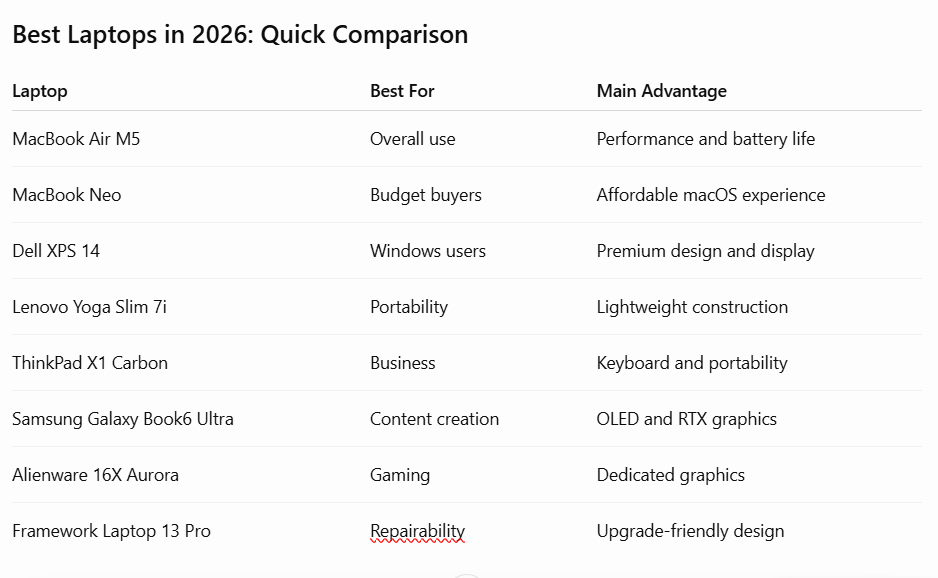
If you want a balanced everyday laptop, the MacBook Air M5 is an excellent choice. If your budget is limited, the MacBook Neo offers an attractive entry-level experience.
Windows users looking for a premium machine should consider the Dell XPS 14, while the Lenovo Yoga Slim 7i is particularly appealing for portability. Business professionals may prefer the ThinkPad X1 Carbon, whereas content creators can benefit from the dedicated graphics and OLED display options available in the Samsung Galaxy Book6 Ultra.
Gamers should prioritize dedicated graphics and cooling performance, making the Alienware 16X Aurora worth considering. Meanwhile, people who value repairability and hardware upgrades should look at the Framework Laptop 13 Pro.
Before placing an order, compare the exact processor, memory, storage, display, warranty, and local price of each configuration. Laptop specifications and availability can differ between countries and retailers.
Frequently Asked Questions (FAQs)
1. What is the best laptop to buy in 2026?
The Apple MacBook Air 13-inch M5 is one of the strongest overall choices in 2026 because of its performance, portability, build quality, and battery life. However, the best option depends on your operating system preference and budget.
2. Which laptop is best for students in 2026?
Students should consider laptops that offer good battery life, portability, a comfortable keyboard, and at least 16GB of RAM when possible. The MacBook Air M5 and Lenovo Yoga Slim 7i are attractive options.
3. Is 16GB RAM enough for a laptop in 2026?
Yes. For most everyday users, students, office workers, and general multitasking, 16GB is a practical amount of memory. However, professional video editing, 3D work, and virtual machines may benefit from 32GB or more.
4. Which laptop is best for gaming in 2026?
The Alienware 16X Aurora is a strong gaming-focused option. Before purchasing, compare its GPU configuration, cooling performance, display refresh rate, and price with other gaming laptops.
5. Are MacBooks better than Windows laptops?
Neither platform is universally better. MacBooks offer an integrated hardware and software experience with excellent battery efficiency. Windows laptops provide broader hardware choices, gaming compatibility, and support for many specialized applications.
6. How much SSD storage should a laptop have?
For most users, 512GB is a sensible starting point. Users who install many applications, play large games, or work with high-resolution media should consider 1TB or more.
7. How long should a good laptop last?
A well-maintained laptop can often remain useful for four to six years or longer, depending on its specifications, build quality, repairability, and workload. Regular software updates and proper maintenance can help extend its useful life.
Final Thoughts
Finding the best laptop in 2026 requires more than comparing processor names or choosing the most expensive model. The right purchase should match your everyday requirements, performance expectations, and available budget.
Whether you choose an Apple MacBook, a premium Dell XPS, a business-focused Lenovo ThinkPad, or a powerful gaming laptop, prioritize the specifications that matter most to your work.
Take time to compare different configurations, check independent reviews, and verify local warranty coverage before making your final decision. A carefully selected laptop can provide reliable performance and a satisfying computing experience for many years.
Research Sources & Fact-Checking
The recommendations were cross-checked against these established technology publications:
- RTINGS – The 8 Best Laptops of 2026.
- TechRadar – Best Laptops of 2026.
- Tom’s Hardware – Best Laptops 2026.
- PCWorld – Best Laptops 2026.
- Consumer Reports – 13 Best Laptops of 2026.