Apple Touchscreen MacBook: Features, Specifications, Price, and Everything You Need to Know
Apple has finally taken a major step in the evolution of its MacBook lineup by introducing touchscreen technology to the Mac for the first time. For years, Apple users have wondered whether the company would ever bring direct touch interaction to its laptops. That question has now been answered with the introduction of the new MacBook Pro featuring a touchscreen OLED display.
Announced on October 28, 2026, the new MacBook Pro combines a tandem OLED display, Apple’s M5 Pro and M5 Max processors, an improved design, and touch-enabled macOS features. The device is designed to give professionals, developers, designers, and everyday users another way to interact with their computers without removing the traditional keyboard and trackpad experience.
This announcement represents an important development for Apple’s laptop strategy. However, the new touchscreen MacBook is more than just a conventional laptop with a touch-sensitive panel. It also introduces display improvements, interface changes, and additional capabilities aimed at creative and professional workflows.
In this article, we will explore everything you need to know about Apple’s touchscreen MacBook, including its features, specifications, touchscreen capabilities, expected performance, pricing, availability, and whether it is worth considering.
What Is the Apple Touchscreen MacBook?
The Apple touchscreen MacBook is the latest MacBook Pro lineup featuring Apple’s first touchscreen-enabled Mac display. Officially introduced as the MacBook Pro with PROLED XDR Display, the new laptop brings direct touch interaction to macOS while maintaining the familiar MacBook design.
Previously, MacBook users primarily interacted with macOS through a keyboard, trackpad, or external mouse. With the new touchscreen models, users can also tap, swipe, pinch, zoom, and perform other gestures directly on the display.
Apple has introduced the touchscreen feature in both 14-inch and 16-inch MacBook Pro models. These laptops also feature tandem OLED display technology, M5 Pro and M5 Max processors, and a redesigned interface experience.
Importantly, this is not a convertible laptop that folds completely into a tablet. It retains the traditional MacBook Pro form factor, allowing users to choose between touch input and conventional laptop controls.
Apple Touchscreen MacBook: Key Features
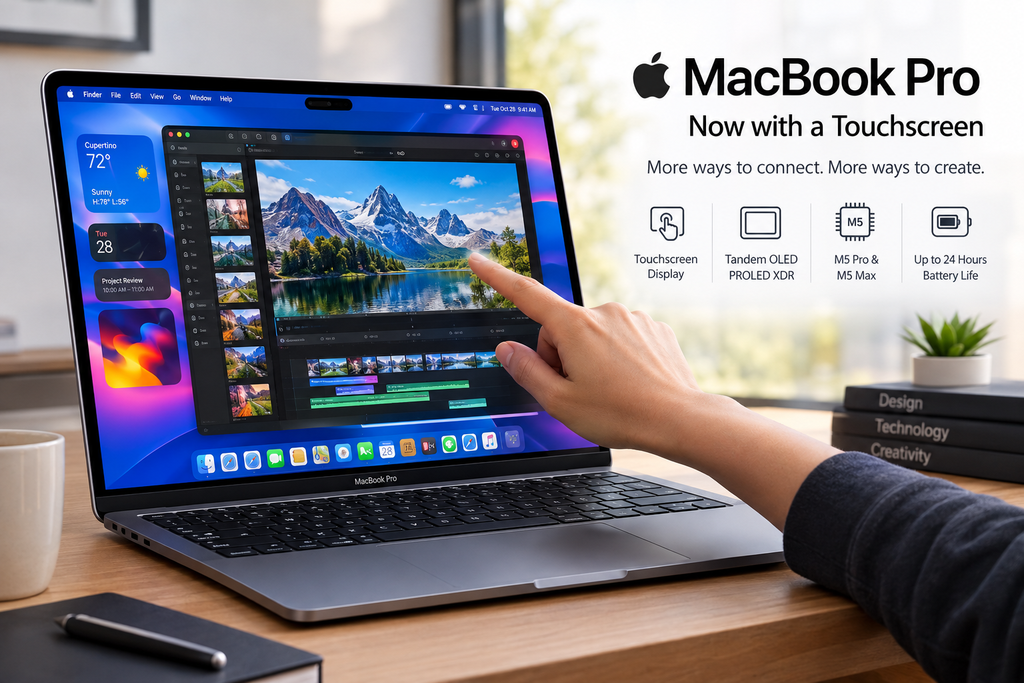
The new touchscreen MacBook introduces several important improvements. Here are some of its most notable features.
1. First-Ever Touchscreen Support on a MacBook
The biggest change is undoubtedly the introduction of touchscreen functionality.
Users can now interact directly with macOS by touching the display. Common actions such as scrolling through websites, zooming into photographs, moving application windows, and dragging files can be performed using fingers.
The touchscreen works alongside the existing keyboard and trackpad rather than replacing them. This gives users more flexibility when completing everyday tasks.
For example, someone editing a presentation can use the trackpad for precise navigation and touch gestures to move visual elements around the screen. Similarly, users browsing the web can scroll through pages using simple finger movements.
Apple has also introduced software improvements that make certain interface elements easier to select using touch input.
2. Tandem OLED PROLED XDR Display
Another major highlight is the new PROLED XDR display, which uses tandem OLED technology.
Unlike traditional LCD panels, OLED technology allows individual pixels to produce their own light. This makes it possible to display deeper blacks, improved contrast, and more vibrant images.
Apple’s new display offers several notable specifications:
Tandem OLED display technology.
Up to 2,000 nits peak HDR and SDR brightness.
Up to a 10,000,000:1 contrast ratio.
Adaptive refresh rates up to 120Hz.
Support for P3 and Adobe RGB color spaces.
Improved color accuracy and visual consistency.
These improvements could make a significant difference for photographers, video editors, graphic designers, and other professionals who depend on accurate color reproduction.
The higher contrast and improved brightness also make the display attractive for watching movies, editing photographs, and working with HDR video content.
3. Apple M5 Pro and M5 Max Processors
Performance remains an important part of the MacBook Pro experience.
Apple has equipped the new touchscreen models with its M5 Pro and M5 Max processors. These chips are designed to handle demanding professional workloads, including video editing, software development, 3D rendering, and AI-related tasks.
The M5 Pro is aimed at professionals who need powerful computing capabilities for everyday intensive work. The M5 Max targets users who require additional graphics performance and memory capacity for more demanding projects.
Depending on the configuration, the new MacBook Pro supports:
Up to 128GB of unified memory.
Up to 16TB of SSD storage.
Advanced GPU performance.
Hardware acceleration for demanding AI workloads.
For professionals working with large video files, complex software projects, and high-resolution graphics, these configurations provide substantial flexibility.
4. Dynamic Island Comes to MacBook
Apple has also introduced Dynamic Island to the MacBook Pro.
Previously associated with Apple’s iPhone lineup, Dynamic Island now provides an interactive area near the top of the MacBook display.
It serves as a central location for selected system activities, including Spotlight, Live Activities, and Siri AI.
Users can interact with supported activities, access information, and control certain functions without navigating away from their current applications.
This feature represents another step toward creating a more connected experience across Apple’s devices.
5. Thinner and Lighter Design
Apple has also made improvements to the physical design of the touchscreen MacBook Pro.
Despite introducing a new display technology, the company has managed to make the latest models thinner and lighter than their predecessors.
The new 14-inch model weighs approximately 3 pounds, while the 16-inch model weighs around 4 pounds.
The redesigned body makes the laptop easier to carry, particularly for professionals who frequently travel between offices, studios, universities, and other work locations.
Apple has also redesigned the hinge to provide greater stability when users interact with the touchscreen.
6. Improved Battery Life
Battery performance is another important consideration for professional laptop users.
According to Apple, the new MacBook Pro can deliver up to 24 hours of battery life, depending on the configuration and usage conditions.
This makes the device suitable for users who need to work away from a power outlet for extended periods.
Actual battery performance will vary depending on factors such as screen brightness, software workloads, connected accessories, and processor configuration.
7. Better Creative and Professional Workflows
Apple is positioning touchscreen support as a useful addition for creative professionals.
Graphic designers can interact directly with visual elements, while musicians can use supported software instruments through the display.
Video editors can also benefit from touch-based interactions when selecting clips, adjusting timelines, and navigating editing applications.
Apple has highlighted compatibility with applications such as:
Adobe Lightroom
DaVinci Resolve
Blender
Canva
Microsoft Word
Microsoft Excel
Microsoft PowerPoint
Notion
Logic Pro
Final Cut Pro
The level of touchscreen functionality will depend on how individual applications implement and support the feature.
Apple Touchscreen MacBook Price and Availability
Apple officially announced the new touchscreen MacBook Pro on October 28, 2026. Pre-orders opened on the same day, with retail availability scheduled to begin on November 6, 2026.
The starting prices announced for the United States are:
| MacBook Pro Model | Starting Price (USD) |
| 14-inch M5 Pro | $2,899 |
| 16-inch M5 Pro | $3,399 |
| 14-inch M5 Max | $4,499 |
| 16-inch M5 Max | $4,799 |
These are official US starting prices. Final prices can vary depending on memory, storage, display options, taxes, and regional pricing.
For customers in Bangladesh, the final retail price may differ because of import costs, taxes, currency exchange rates, and local retailer pricing. Buyers should check authorized sellers for confirmed local availability and pricing.
Does the Apple Touchscreen MacBook Support Apple Pencil?
One important question is whether users can use an Apple Pencil with the new touchscreen MacBook.
Although the device supports direct finger input, it is not designed as a convertible tablet. The laptop retains its traditional MacBook Pro form factor, and early hands-on reporting indicates that Apple Pencil support is not included.
This means users should not purchase the touchscreen MacBook expecting the same drawing experience available on an iPad Pro.
However, finger-based interaction can still be useful for sketching, selecting objects, navigating creative software, and interacting with supported applications.
Touchscreen MacBook vs Traditional MacBook Pro
The touchscreen MacBook introduces several changes compared with conventional MacBook Pro models.
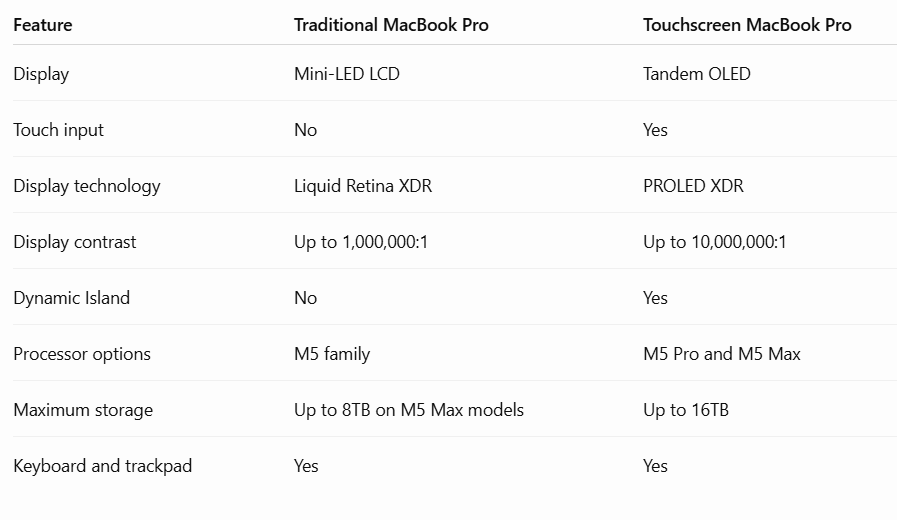
The most important differences are the touchscreen, OLED display, Dynamic Island, and increased maximum storage capacity.
Is the Apple Touchscreen MacBook Worth Buying?
Whether the new touchscreen MacBook is worth buying depends on your requirements and budget.
For creative professionals, the combination of an OLED display, powerful processors, and direct touch interaction could make the device an attractive workstation.
Photographers and video editors may particularly appreciate the improved contrast, brightness, and expanded color support.
Developers and software engineers can also benefit from the powerful M5 Pro and M5 Max processors, especially when working with demanding applications and local AI workloads.
However, not everyone needs a touchscreen laptop. Users who primarily work with documents, spreadsheets, web browsers, and traditional desktop applications may find that a conventional MacBook Pro already provides everything they need.
The higher starting price is another factor to consider. The touchscreen models carry a significant price premium over comparable non-touchscreen configurations.
It is also important to remember that this laptop does not replace an iPad. It does not offer a convertible tablet design, and Apple Pencil support is absent.
For existing MacBook users, upgrading makes the most sense if the improved display and touch capabilities provide genuine benefits to their daily workflow.
Frequently Asked Questions (FAQs)
1. Has Apple Released a Touchscreen MacBook?
Yes. Apple officially announced its first touchscreen MacBook Pro on October 28, 2026. The new lineup features a touchscreen tandem OLED display and M5 Pro or M5 Max processors.
2. What Is the Starting Price of the Apple Touchscreen MacBook?
The 14-inch M5 Pro touchscreen MacBook Pro starts at $2,899 in the United States, while the 16-inch M5 Pro version starts at $3,399.
3. Does the New MacBook Pro Have an OLED Display?
Yes. The touchscreen MacBook Pro features Apple’s new tandem OLED-based PROLED XDR display, offering improved brightness, contrast, and color reproduction.
4. Does the Apple Touchscreen MacBook Support Apple Pencil?
No. The announced touchscreen MacBook Pro does not include Apple Pencil support. Its touch functionality is primarily designed for finger-based interaction.
5. What Processor Does the Touchscreen MacBook Use?
The new touchscreen MacBook Pro is available with Apple’s M5 Pro and M5 Max processors.
6. How Much Storage Does the New Touchscreen MacBook Support?
Depending on the configuration, the new MacBook Pro supports up to 16TB of SSD storage.
7. When Will the New Touchscreen MacBook Be Available?
Apple opened pre-orders on October 28, 2026, with retail availability scheduled to begin on November 6, 2026.
8. Is the Touchscreen MacBook a 2-in-1 Laptop?
No. It retains the traditional MacBook Pro laptop design rather than converting into a tablet.
Final Thoughts
Apple’s first touchscreen MacBook Pro marks an important development in the company’s laptop lineup. After years of relying on keyboard and trackpad interaction, Mac users can finally interact directly with the display.
The combination of tandem OLED technology, M5 Pro and M5 Max processors, Dynamic Island, improved portability, and touch-enabled macOS creates an interesting new direction for professional laptops.
However, the touchscreen itself is not necessarily a reason for every MacBook owner to upgrade. The real value comes from the complete package, particularly the improved display and professional performance capabilities.
For designers, photographers, video editors, developers, and other demanding users, the new MacBook Pro could be an appealing option. For everyday users, a traditional MacBook may still offer better value.
Ultimately, Apple’s touchscreen MacBook is an important evolution of the MacBook Pro rather than a complete replacement for the traditional laptop experience.